Patching, explained
Fix an xDelta checksum mismatch
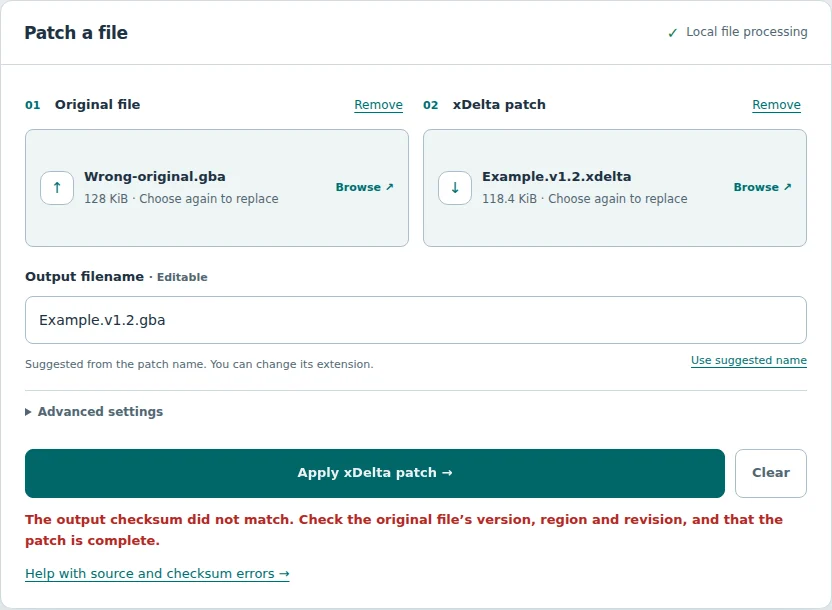
A checksum error means the result did not match the checksum in the patch. Keep validation on and check the original before trying again.
What to check first
- Read the patch instructions. Confirm the required game or file, region, revision and patch version. Similar filenames do not prove the contents match.
- Check whether the original has changed. Trimming, adding or removing headers, earlier patches and incomplete copies can alter the data a patch needs. Use the exact form specified by the creator. Some update patches intentionally require an earlier modified version.
- Check the ZIP selection. If the patch expects a file inside an archive, check the selected entry. Use Choose a different file inside to reopen the archive. Use ZIP file itself only when the patch was made for the archive. You do not always need to extract ZIPs outside this tool.
- Compare the source hash if one is provided. Use the same algorithm as the creator. A matching filename, region label or file size alone is not enough.
- Check the patch download. If the source matches but the error persists, obtain a fresh, complete copy of the correct patch from the creator. A damaged patch can also cause incorrect output.
- Try again with validation enabled. Replace only the file that needs changing. The tool retains the other selection after an error.
What the error means
xdelta reconstructs output in sections called windows. When a patch includes a window checksum, the decoder compares it with the reconstructed output. A mismatch stops the operation. The message does not give you a full-file source CRC32, MD5 or SHA-1.
A wrong original is a common cause, but the error alone cannot identify the exact cause. Corrupt patch data or another decoding problem can also lead to a mismatch. This patcher discards partial output on error and does not offer it as a completed download.
Renaming a file does not fix the error. The decoder reads its contents. For example, two NDS dumps with different revisions or trimming can differ even if their names look alike. Whether a trimmed file is usable depends on the patch’s actual source requirements.
Compare a file hash
This tool does not display a whole-file CRC32, MD5 or SHA-1. If the creator supplies a reference hash, calculate the hash of your selected original with a separate local utility and compare the complete value using the same algorithm.
For a SHA-256 reference, these commands are examples. Replace the quoted filename with your original file’s name.
Windows PowerShell
Get-FileHash -LiteralPath "Original.gba" -Algorithm SHA256macOS Terminal
shasum -a 256 "Original.gba"Linux Terminal
sha256sum -- "Original.gba"If the reference is MD5 or SHA-1, use that algorithm instead. A SHA-256 result cannot be compared with a CRC32 value. Matching a hash confirms agreement with that reference to the extent of the algorithm; it does not prove the reference is trustworthy or grant rights to use the file.
Should you skip checksum validation?
Usually, leave it off. Skip checksum validation suppresses an important check. It does not change the source into the version the patch needs. A patch can finish with this setting enabled and still produce incorrect bytes.
Only use the option when the patch creator specifically instructs you to do so and provides a way to verify the result. If you do not know why validation failed, resolve the file mismatch first.
Other errors and output checks
| Message or symptom | Next step |
|---|---|
| Source data could not be read / source too short | Check the exact original and whether you chose the correct ZIP entry or an incomplete file. |
| Patch could not be read | Confirm .xdelta format and a complete download. Renaming IPS, BPS or UPS does not convert it. |
| ZIP integrity check failed | Get a fresh archive, or verify it with an extraction tool on your device. |
| Memory or output limit | Try more available memory or a desktop patcher. This is a resource issue, not proof of a wrong original. |
After success, compare any expected output hash supplied by the creator and follow their instructions for using it. Output size alone is not a pass/fail test: a valid patch can produce a smaller or larger file.
If you still need help, contact the patch creator with the error message, patch version and source details they request. You do not need to share your original file publicly.
Technical reference: xdelta’s checksum mismatch explanation.
Try again in xDelta Patcher → · Read the full patching steps
Keep reading